Below you will find answers to the most common questions we are asked about our Digital Skills qualifications.

They are broadly grouped by topic covering:

  • Qualifications Structure and Content
  • Delivering
  • Assessing
  • Administering

You may also find the following pages useful:

Full details about our Essential Digital Skills qualifications

Full details about our Digital Functional Skills qualifications

Guidance on using our external assessment platform, Surpass

If you have a question that isn’t answered below, please contact us and we will ensure it is answered, we may even add to the list below!

Qualifications Structure and Content
What age are the qualifications for?

The qualifications are for learners aged 16+ years. They are fundable under a new legal entitlement for adults (19+).

We have learners that are Entry 1 and Entry 2 is this suitable for them?

Essential Digital Skills qualifications are only available at Entry 3 and Level 1 as Entry 1 and Entry 2 are subsumed within Entry 3. Learners operating at Entry 1 or Entry 2 may be able to access the Entry 3 qualification depending on their initial starting point. However, where they need more time to reach the standard for Entry 3 you may find our Digital Skills for Life and Digital Skills for Work qualifications helpful. These qualifications are designed around the Essential Digital Skills standards so can be used as an entry route into Essential Digital Skills.

What content does the qualification cover?

The course content meets the national standards for Essential Digital Skills and focuses on five key areas including:

  • Using devices and handling information
  • Communicating
  • Being safe and responsible online
  • Creating and editing
  • Transacting online
How long will it take to complete the qualification?

E3 Essential Digital Skills: 45 GLH (guided learning hours)

L1 Essential Digital Skills: 45 GLH (guided learning hours)

E3 Digital Functional Skills: 60 GLH (guided learning hours)

L1 Digital Functional Skills: 65 GLH (guided learning hours)

Delivering
Do you offer a pre-assessment tool?

Yes, we offer a simple pre-assessment tool which is available here.

The Good Things Foundation also offers a planner tool which was created in line with the national standards for Essential Digital Skills. More information can be found on the Good Things Foundation website.

bksb’s Essential Digital Skills course includes a diagnostic assessment, learning resources and progress checks which cover 5 core areas across two tiers of ability. Centres approved for Gateway Qualifications EDSQ can benefit from an exclusive discount on bksb’s Digital Skills Assessments and Resources.

What devices can I use to teach?

You can use any device to teach our digital qualifications as we have designed the qualification content to be applicable to desktops, laptops, tablets and phones. Your teaching should cover a range of devices that are relevant to the learners.

Learners can take the assessment on any device as long as there is a good internet connection. However, we would strongly recommend that the assessment is taken on a device with a larger screen and physical keyboard, such as a desktop or laptop computer.

Which courses can learners progress to after completing EDSQ?

The Essential Digital Skills qualifications are designed to give learners the skills that are required in modern life and work. On completion of the Entry level 3 qualification, learners could progress to the Level 1 in EDSQ or Digital Functional Skills qualification (DFSQ).  Learners who complete the Level 1 could progress to a variety of digital skills programmes.

Further information about qualifications available from Gateway Qualifications is available in our digital qualifications section.

Assessing
How will the qualification be assessed?

The qualifications are assessed using an online platform. There is one timed assessment at each level. There are a small number of tasks at Entry level 3 assessed through tutor observation.

Do we need Microsoft Office software?

No – as part of the assessment, the learners will be required to produce and upload documents, such as leaflets and spreadsheets with graphs. However, this can be done using any suitable software.

Are there assessment windows?

No – the assessments are available on demand.

Please refer to the Essential Digital Skills Instructions for the Conduct of Assessments for further information.

What to do if a learner is absent and unable to take a scheduled test?

You do not need to do anything ahead of the assessment. Allow the exam date to pass and then schedule another assessment. There is no additional charge for this. Scheduled assessments can be deleted if the assessment date is more than 24 hours in the future.

When can I expect to receive my results for new papers when pass mark is not yet set?

Gateway Qualifications will hold awarding meetings for each new  paper. These meetings will take place as soon as there are sufficient learner numbers to issue a reliable and valid outcome. We will issue results and certificates to candidates who have sat the paper prior to this date as soon as possible following the meeting. For subsequent candidates we will issue results within 5 working days of successfully verified results.

The pass mark is typically expected to align with previously published pass marks. Therefore please refer to the Pass Marks document in Prism and use this as an indication of a clear pass.

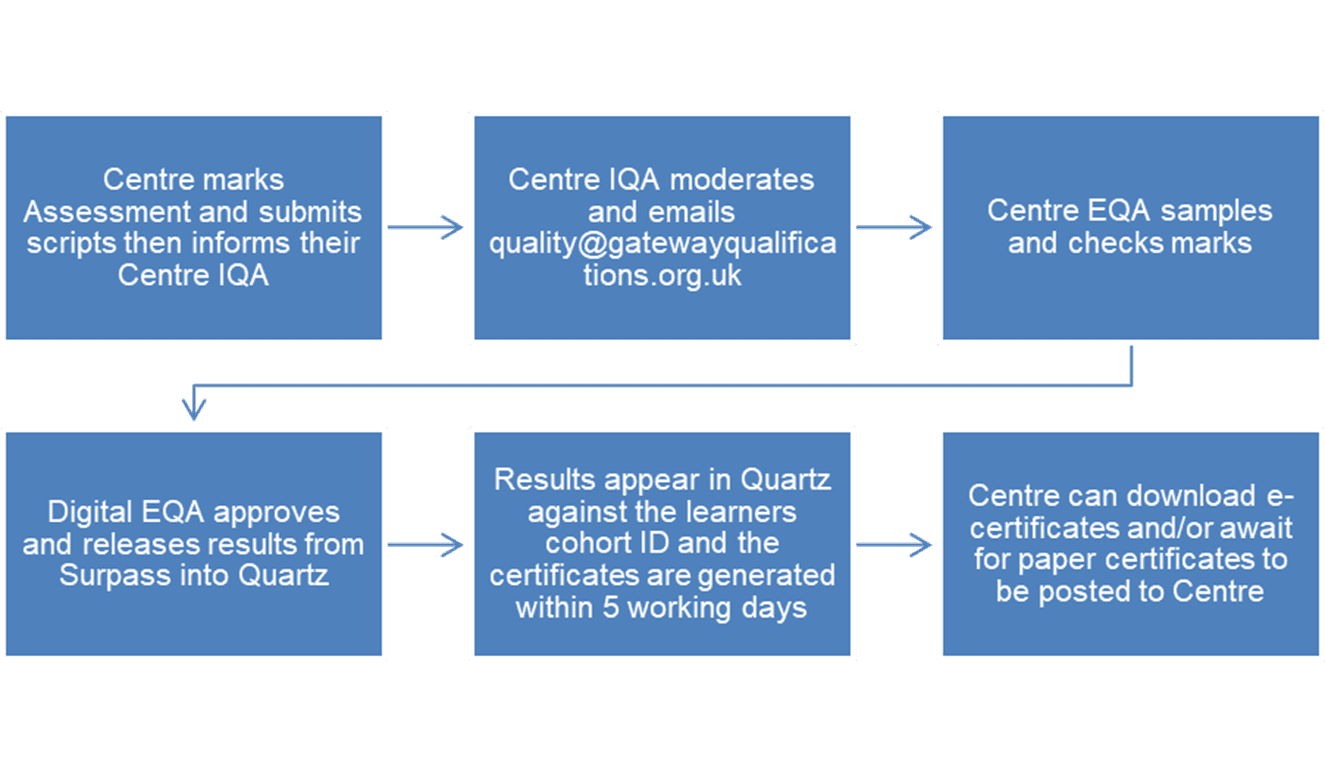
Here is a flowchart of the EDSQ awarding process

When can I expect my results when there is a pass mark? 

For DFSQ Level 1, results are available 6 days post-exam once the pass mark is set.

For all levels Essential Digital Skills & Entry Level 3 DFSQ, results are released once the designated staff have Marked, Moderated and emailed Quality with their sampling record and EQA activity has been completed.

Results are then issued within 5 working days for digital certificates and 10 working days for physical certificates.

What are the minimum requirements for the assessment software?

Our Essential Digital Skills assessments use Surpass HTML Delivery which allows the assessment to run in an internet browser.

Full details of the technical requirements and supported browsers are available on our Online Assessment – System and Hardware Requirements page.

Can my learners use Google Drive?

Surpass operates using the local physical hard drive on the learner’s device.  Learners, therefore, cannot use virtual (cloud based) drives when uploading or saving assessment evidence.

Administering EDSQ & DFSQ
How far in advance should I book the assessment?

Once you are confident that learners are ready to take the assessment, you can proceed to schedule at any time in the Surpass system, provided the learners have been registered on QuartzWeb.

We highly recommend learners sit a mock assessment in Surpass prior to attempting a live assessment to allow them to gain the full assessment experience, and to familiarise them with the online platform.

Is there a preferred internet browser that should be used to access the online assessment?

Surpass is widely supported by many internet browsers. Please view our System Requirements section for more information.

What are the software requirements for assessors?

You must log into gateway.surpass.com to view the schedule, invigilate, mark and moderate screens.

How long after starting the course must we register learners on the qualification?

Learners must be registered in a timely manner as detailed within our FAQs for exams officers.

What should we do if a learner is absent and not able to take a scheduled assessment?

You do not need to do anything ahead of the assessment. If a learner is unable to attend an assessment, simply allow the examination date to pass and then schedule another assessment in the usual way. There is no additional charge for this.

You can delete scheduled assessments if the assessment date is more than 24 hours in the future.

How do I schedule a resit?

In most cases, learners will require additional teaching before attempting a resit. These assessments can then be scheduled in the normal way.

Learners do not need to be re-registered on QuartzWeb.

Unable to book resits?

Scenario 1: Sat all papers without difficulties:  

If the learner has sat all available papers with a set pass mark in Quartz, and submitted the exam without issue proceed to email CET with the learner IDs, level of qualification, resit date and marker for DFSQ Entry Level 3 and EDSQ Entry Level 3 and Level 1.

Note: DFSQ Level 1 is externally assessed so does not require a marker

Scenario 2:   Sat all papers, but currently stuck in the system:

If the learner has entered key code but was unable to submit successfully at the time of the exam and is currently stuck Awaiting Upload or displaying connectivity issues (after 24 hours from the assessment date) or pass mark not set (See no pass mark section above).

You will need to contact the Customer Excellence Team to advise if you wish to wait for assessment to be released or whether you would like an immediate resit.

Is there a charge for resits?

If a learner attempts the live assessment and does not pass, you will not be charged a resit fee when you book their next attempt. The resit fee will apply for any subsequent assessments and is the same as the registration fee.

If a learner does not take a scheduled assessment(e.g. is absent), you will not be charged when you rebook their assessment.

How do I apply for a Reasonable Adjustments for Essential Digital Skills?

You do not need to apply for Centre permitted Reasonable Adjustments but maintain a record of the adjustment made. Centre permitted Reasonable Adjustments are provision of additional time and/or a reader.

Refer to page 16 section 4.11 in the Qualification Specification for Reasonable Adjustment guidance and information for Essential Digital Skills.

For any other Reasonable Adjustments, you must complete the ‘Reasonable Adjustments Request Form’ that you can find here.

Is there a charge for taking a mock assessment?

No, the learner registration and certification charge includes access to mock assessments. There is no limit to the number of mock assessments a learner can sit.

Can I delete live or mock assessment bookings?

Centres can delete exams when it’s on the schedule tab by selecting the learner and selecting delete at the bottom of the screen.

The assessment will move to the invigilate screen 24 hours prior to the assessment date.

After 24 hours of the assessment date, the system will automatically clear the assessment

Refer to Cancelling and Rebooking EDSQ and DFSQ Assessments – Gateway Qualifications for further guidance.

How can I request additional Surpass accounts?   

To request additional Surpass accounts Centres are required to update the staff tab on Prism and link all staff members to the relevant role they will be fulfilling for EDSQ or DFSQ.

Note: CET will run a report every week to capture new users therefore, if the user requires immediate access advise them to   notify CET once the above actions are complete.

Note: Users must log into Surpass using their assigned username (e.g., JoeBloggs). The system does not accept email addresses.

Why are my password reset emails are not being received?

 If password reset emails are not being received we would suggest making sure these emails are not going to spam.

We also advise contacting your IT Department and ensure that the following email addresses are whitelisted:

noreply@surpass.com

gateway@surpass.com